Download oobit app to pay with crypto everywhere.

Scan the QR code to download the app

Download for iOS

Get the oobit app from the App Store.

Download for Android

Get the oobit app from the Google Play

If you have any questions, contact support

Personal

Business

NEW

Oobit Business

Issue corporate cards, pay vendors and teams worldwide, and move funds to any bank.

Oobit Plug and Pay

Power your wallet with embedded global payments

Pay

Crypto Card

Spend crypto instantly at millions of stores with Oobit

Send

Send Crypto To Any Bank

Send crypto and receive local currency directly to bank accounts

Connect

DePay

Pay directly from the wallet you trust.

Features

Business

More

Newsroom

Stay updated with Oobit's latest news & launches

Stablecoin

What They Are and How to Use Them

Cashback

What is Cashback and How to Earn up to 10% with Oobit

Tether

The Digital Dollar Powering Global Payments

Pay with Bitcoin

Spend Bitcoin at Over 150 Million Visa Merchants

OOB

Keeps money open. Free. Access. 24/7

English

English

Portuguese

Spanish

DownloadGet started

Follow us

Download

Back

Crypto Card

Spend crypto instantly at millions of stores with Oobit

DePay

Pay directly from the wallet you trust

Send Crypto To Any Bank

Send crypto and receive local currency directly to bank accounts

Oobit Business

Issue corporate cards, pay vendors and teams worldwide, and move funds to any bank.

Oobit Plug and Pay

Power your wallet with embedded global payments

Newsroom

Stay updated with Oobit's latest news & launches

Stablecoin

What They Are and How to Use Them

Cashback

What is Cashback and How to Earn up to 10% with Oobit

Tether

The Digital Dollar Powering Global Payments

Pay with Bitcoin

Spend Bitcoin at Over 150 Million Visa Merchants

OOB

Keeps money open. Free. Access. 24/7

Download

Bitcoin

How to buy Bitcoin with Apple pay

Oobit

 MIN READ

June 23, 2025

Table of contents

How to Buy Crypto with Apple Pay (and Pay with It!): A Fast and Easy Guide

Whether you're already comfortable with crypto or just looking for a smoother way to manage your digital assets, Apple Pay now plays a role in streamlining how you buy and spend. This guide shows you how to buy crypto using Apple Pay, how to spend it, and why apps like Oobit are making it even more seamless.

What is Apple Pay?

You probably already use Apple Pay for daily purchases, whether it's tapping your phone at the grocery store or checking out online without a card in hand. It’s a seamless, secure way to pay using the cards stored in your Apple Wallet — and now it’s becoming one of the fastest ways to buy crypto too.

Quick Highlights:

Why Use Apple Pay to Buy Crypto?

More and more crypto platforms now let you use Apple Pay to buy digital currencies. It's faster and safer than traditional methods like bank transfers, and you don’t have to worry about entering card details every time.

Benefits:

If you’ve been searching for the easiest way to buy bitcoin with Apple Pay or looking for the best crypto cards to use, Apple Pay-based apps are a great place to start.

Setting Up Apple Pay with Oobit

Among the available options, Oobit stands out for its smooth experience. It’s designed for people who just want crypto payments to work without the deep tech knowledge.

Here’s how to get started:

  1. Download Oobit from the App Store
  2. Create an account using your email
  3. Complete a quick KYC verification
  4. Link Apple Pay as your preferred payment method:

Oobit is currently available in the EU, with more countries coming soon — including the USA, Brazil, Argentina and Mexico.

A Few Alternatives to Consider

While Oobit is our top recommendation for buying and spending crypto with Apple Pay, here are a few other platforms worth mentioning:

These apps vary in terms of fees, availability, and ease-of-use.

How to Buy Crypto in Oobit with Apple Pay

Here’s how the actual purchase process looks inside the Oobit app, based on the latest version:
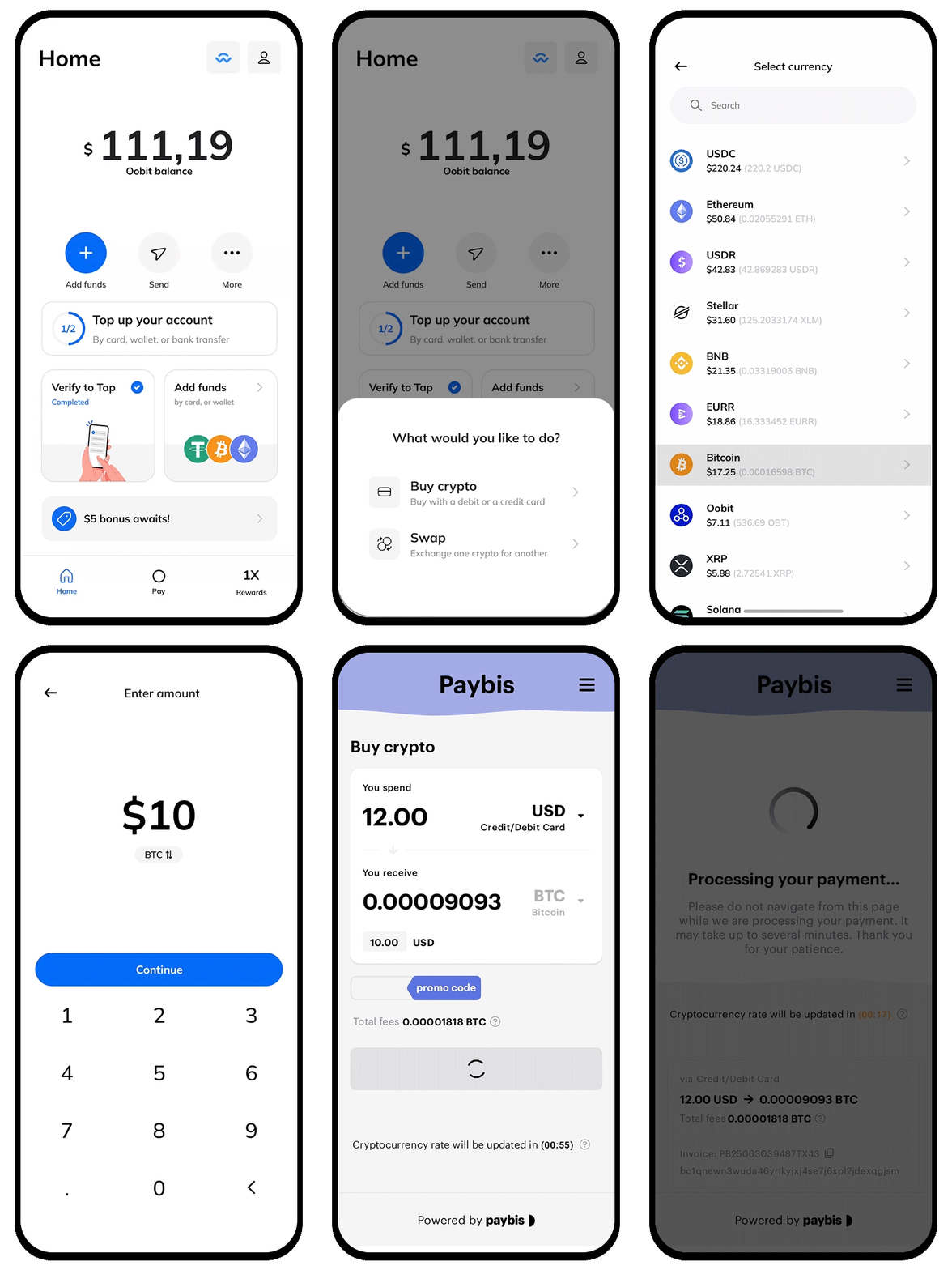
  1. Open the Oobit app and land on the main dashboard.
  2. Tap the “More” button on the Home screen.
  3. Select "Buy crypto" and the cryptocurrency you want to buy (e.g., Bitcoin, USDT, ETH).
  4. Enter the amount in your local currency or crypto equivalent.
  5. Choose Apple Pay as your payment method from the available list.
  6. Confirm the transaction details (amount, fees, wallet destination).
  7. Use Face ID or Touch ID to authenticate with Apple Pay.

Your crypto will show in your Oobit account in seconds.

What About Spending It?

Oobit’s Tap & Pay feature is what makes the magic happen. Once your Apple Pay is integrated, you can use your crypto directly from your Apple Wallet with no extra steps or conversions. It works just like a regular card and is accepted at over 100 million businesses worldwide, anywhere Visa or Mastercard are accepted - including coffee shops, restaurants, grocery stores, and more.

Summary

Whether you’re crypto-curious or already holding a bit of Bitcoin, using Apple Pay to buy and spend crypto is one of the easiest upgrades you can make.
And while other platforms are catching up, Oobit makes the entire experience, from buying to spending, fast, secure and incredibly smooth.
To recap:

Conclusion

Bitcoin

Get smarter with every email, sign up for Oobit's newsletter today.

Thank you!
Your submission has been received!

Oops! Something went wrong while submitting the form.

Oobit Logo

Oobit Logo

Personal

Crypto CardSend to BankConnectFAQ

Business

NEW

Corporate cardsPlug and Pay

Explore

NewsroomStablecoinCashback TetherPay with BitcoinOOBBlogResearch

Company

AboutCareersAmbassadorsPress KitPrivacy NoticeTerms of Use

Social

X.comLinkedinInstagramYouTubeReddit

© Oobit Technologies 2026. All rights reserved.
Oobit provides technology that enables users to spend digital assets through existing payment networks. Services are subject to regional availability and regulatory requirements.
Oobit operates through multiple entities globally. Certain features may be provided by licensed partners depending on your location.